ActiveAdmin Tutorial
- Last modified atWhat is ActiveAdmin?
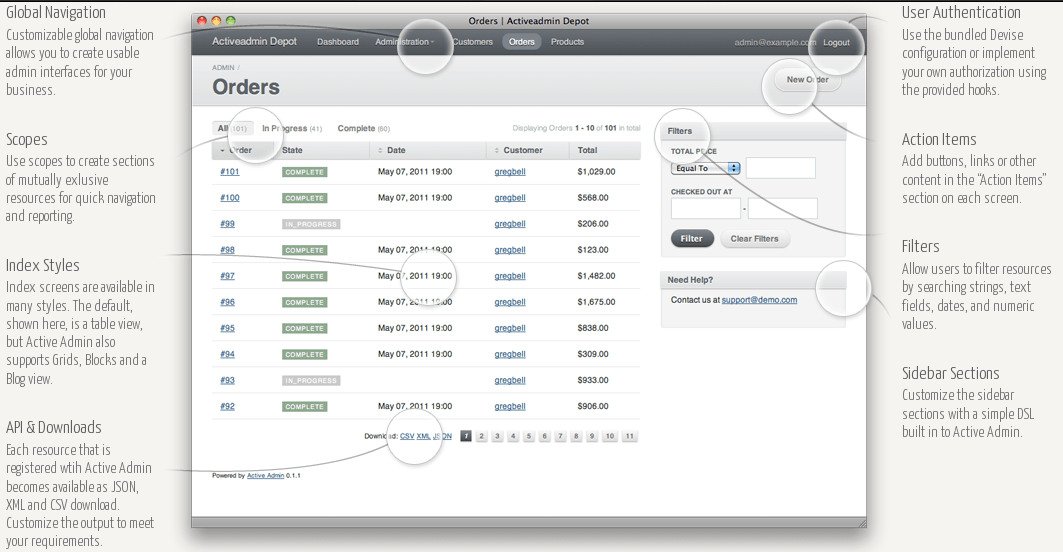
Active Admin is a Ruby on Rails plugin for generating administration sytle interfaces. The goals of this plugin are easy-to-use for non-techical users and fast for developers.
How To Use ActiveAdmin
Suppose we are create Blog web application.
$> rails new blogAdd the following line to your Gemfile.
# Gemfile
gem 'activeadmin'
Run bundle install.
$> bundle installInstall ActiveAdmin.
$> rails generate active_admin:installAfter installation is finished, it will create:
- An configuration file on config/initializers/active_admin.rb
- AdminUser model on app/models/admin_user.rb
- An directory called app/admin to configure the admin interface of our resource.
- Migration files.
Migrate your db and start the server.
$> rails db:migrate
$> rails server
Visit http://localhost:3000/admin and log in using:
- Email: admin@example.com
- Password: password
Next, for integration with our model, let’s create Post model.
$> rails g model Post title:string content:textCreate admin interface for Post model. Because we use ActiveAdmin, we don’t need to create controller for Post model. This generator will create file on app/admin/posts.rb.
$> rails generate active_admin:resource PostAbove command creates a file at app/admin/posts.rb for configuring the resource.
ActiveAdmin.register Post do
  index do
    column :title
    column :content
  end
end
Visit http://localhost:3000/admin/posts to see the result.
More information about ActiveAdmin
- Tags:
- #ruby
- #rails
- #ruby on rails
Sponsored Links
- Register to Digital Ocean cloud with this link and get $200 credit
- Looking for cheap CDN? Bunny is the answer
- Alternative Cloud besides AWS and Digital Ocean